

Deliverability stopped being a technical footnote in February 2024, when Gmail and Yahoo turned a decade of best practice into enforced requirements, and Outlook.com followed in May 2025. This guide covers what the three mailbox providers actually require, the one number that decides whether your domain keeps its inbox access, how to warm a new domain without tripping the filters, and how to diagnose placement problems in the order that finds them fastest.
It is the system-level piece. The tools that support it are ranked in best email warmup tools and best cold email tools.
TL;DR
Three things decide whether your email reaches the inbox in 2026, in this order. First, authentication: SPF, DKIM and DMARC with the From: domain aligned to one of them, required by Gmail and Yahoo for anyone sending 5,000 messages a day or more, and by Outlook.com since May 2025. Second, complaint rate: Google says keep your Postmaster Tools spam rate below 0.10% and avoid ever reaching 0.30%, and Yahoo names the same 0.3% ceiling. Third, list quality and sending consistency, which is what actually moves the complaint rate. Authentication is now the entry ticket rather than the advantage, because every compliant competitor has it too. The differentiator is reputation: send to people who asked, at a rate that does not spike, from a domain whose history matches its volume. Diagnose in order, from DNS records outward to content, and never guess when Postmaster Tools will tell you.
The one number that decides everything
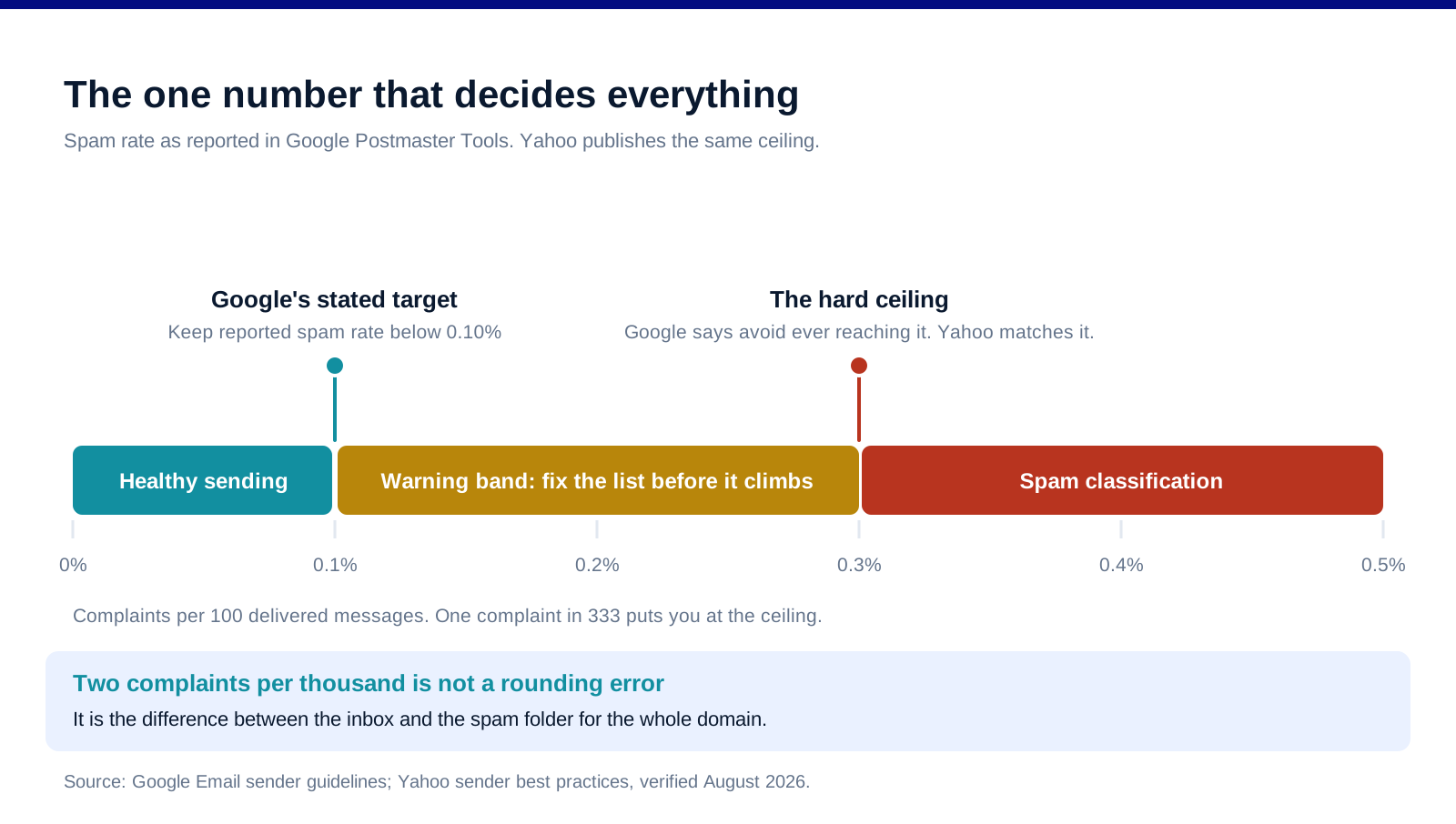
Google's guidance is specific: keep the spam rate reported in Postmaster Tools below 0.10%, and avoid ever reaching 0.30% or higher. Yahoo publishes the same 0.3% ceiling. That is three complaints per thousand delivered messages, or one in 333.
Two things follow from a number that small. The first is that complaint rate is a list problem, not a content problem. At 10,000 sends a month, thirty people hitting "report spam" is enough to put the domain in trouble, and the people most likely to do it are the ones who never asked to hear from you. The second is that recovery is slow. Google notes that improvements in spam rate take time to show up in classification, so a bad month costs you several good ones. Maintaining a genuinely low rate, rather than one that hovers near the line, is what makes a domain resilient when a single campaign underperforms.
Worth knowing: Google does not track open rates and says it cannot verify third-party open-rate figures. Low opens are not evidence of a deliverability problem, and no vendor dashboard reporting them is reading Google's actual signal. Spam rate, domain reputation and IP reputation in Postmaster Tools are the signals that exist.
What the three mailbox providers actually require
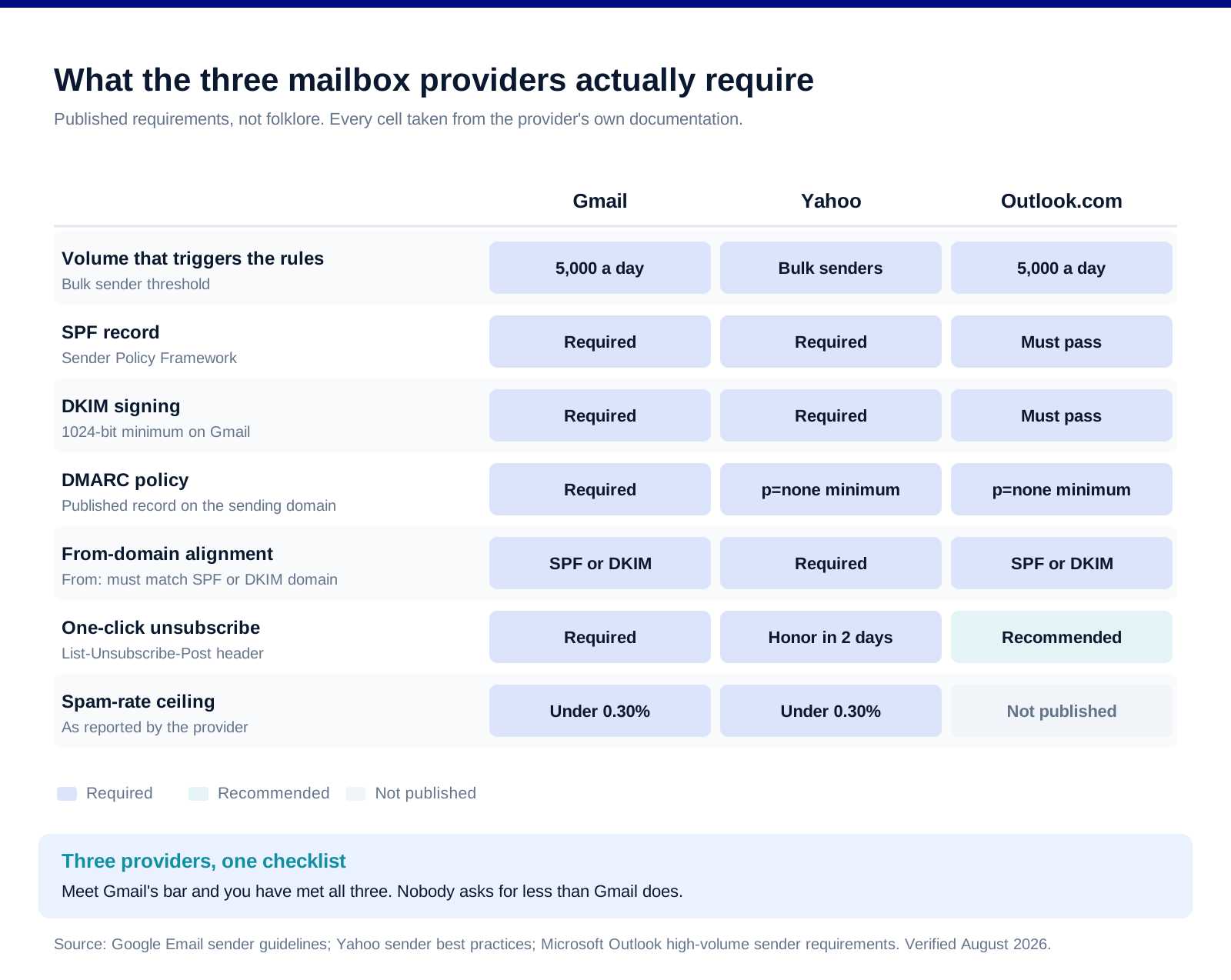
Authentication, all three providers. SPF and DKIM are required by every provider on the list. DMARC is required for bulk senders, at minimum p=none, published on the sending domain. Gmail requires a DKIM key of 1024 bits or longer and recommends 2048.
Alignment is the part teams miss. Publishing the three records is not enough. The domain in your From: header must match the domain that passed SPF or the domain that signed with DKIM. A message can pass SPF, pass DKIM and still fail DMARC because neither aligns with the visible sender. This is the single most common cause of a technically correct setup that still lands in spam.
One-click unsubscribe, for marketing mail. Gmail requires both the List-Unsubscribe-Post: List-Unsubscribe=One-Click header and a List-Unsubscribe header for senders above 5,000 a day. Yahoo requires a working one-click header and asks that unsubscribes be honored within two days. A visible unsubscribe link in the footer does not satisfy this on its own.
Infrastructure that most teams inherit rather than choose. TLS on transmission, a valid PTR record whose hostname resolves forward to the same IP, and no more than 10 DNS lookups in the SPF record. Microsoft calls out the lookup limit explicitly, and flattening or trimming includes is the fix.
The volume threshold is not the safety line. Gmail and Outlook.com name 5,000 messages a day. Below that, requirements are lighter, but the filters are the same filters. Teams sending 2,000 a day with no DMARC record are not exempt from spam classification; they are simply not being enforced against yet.
How authentication stopped being optional
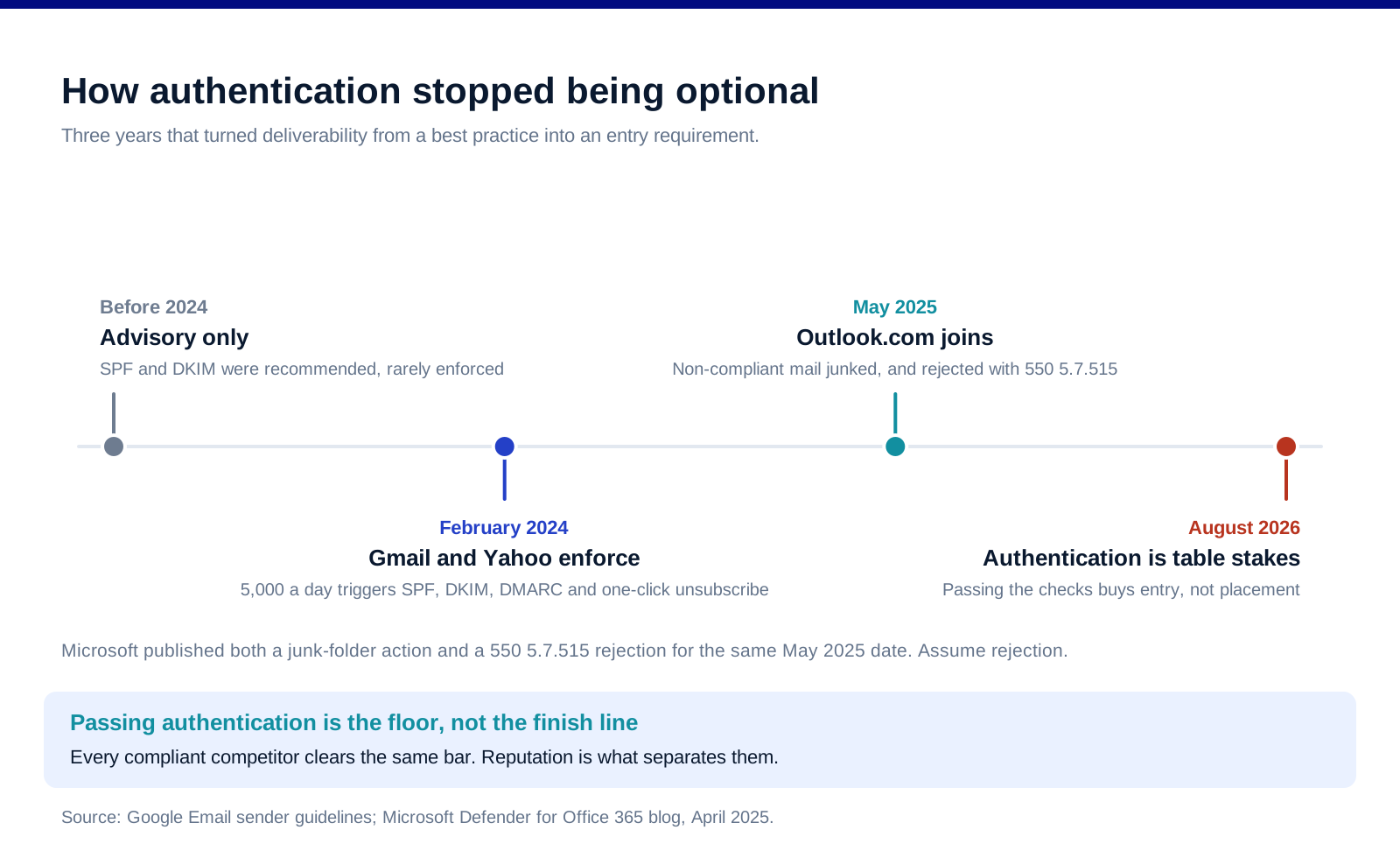
The sequence matters because it explains why the advice you find in older articles is wrong. Before 2024, SPF and DKIM were recommendations, and plenty of senders reached the inbox without them. In February 2024 Gmail and Yahoo made them requirements for bulk senders. In May 2025 Microsoft applied the same bar to Outlook.com, publishing both a junk-folder action and a hard rejection carrying 550 5.7.515 Access denied, sending domain does not meet the required authentication level. Plan for rejection.
The consequence for 2026 is the one most teams have not absorbed. When authentication was optional, having it was an advantage. Now that it is mandatory, having it is worth nothing competitively, because every sender still reaching the inbox also has it. The work that used to sit in DNS has moved to list hygiene, sending patterns and content relevance.
Warming a domain without tripping the filters
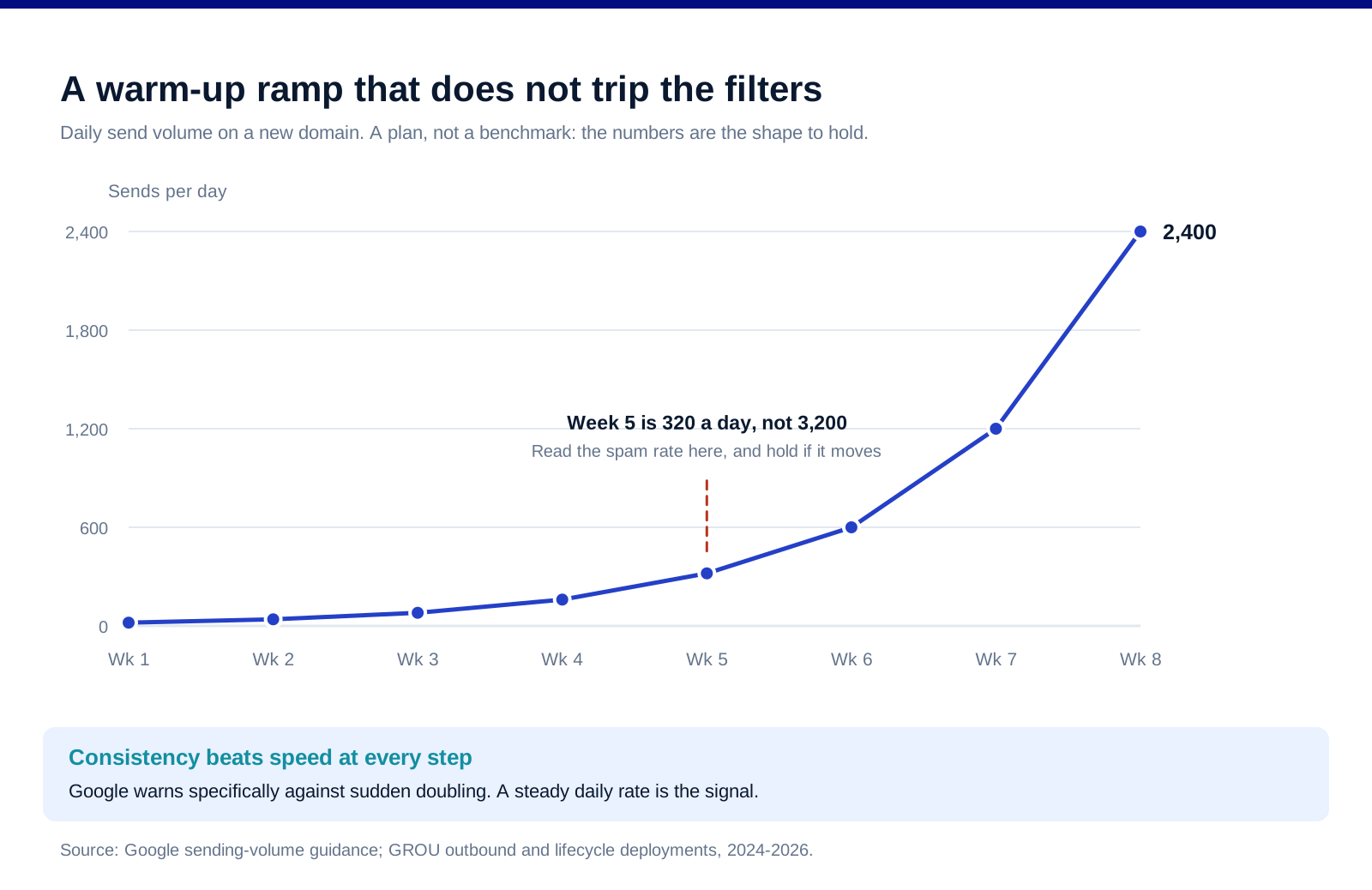
Google's published guidance is unusually direct here: send at a consistent rate, avoid sending in bursts, start low with engaged users, and do not suddenly double previous volumes. The ramp above is the shape that satisfies all four, roughly doubling weekly from a very low base.
Use a separate sending domain, not your primary. A subdomain or a lookalike domain keeps cold outbound reputation away from the domain your invoices and contracts travel on. If the cold domain gets burned, the business does not lose its transactional mail.
Warm with real engagement, not just volume. Warm-up services simulate opens and replies to build early positive signal, which is what the tools in our email warmup roundup exist to do. Mailreach, Warmup Inbox and Instantly all run this as part of their sending stack. Treat it as a floor, not a substitute for sending to people who reply.
Segment the ramp by message type. Google recommends different IPs for different message categories, and consistent From: addresses within a category. Transactional receipts and cold campaigns should not share a sending identity.
Watch what the ramp is actually for. The point of week five is not the 320 sends. It is the spam rate reading you take at week five. If it moves, hold volume until it settles. If bounces or deferrals start, reduce volume until the SMTP error rate drops, then climb again slowly.
The diagnostic order
When placement drops, work outward from the records. Guessing costs weeks.
1. Read Postmaster Tools before anything else. Spam rate, domain reputation, IP reputation and authentication pass rates are all there, and they will usually name the problem in five minutes. Google explicitly says it does not accept allowlist requests, so there is no shortcut around the data.
2. Verify alignment, not just presence. Send a test message and read the authentication headers. SPF pass, DKIM pass and DMARC pass are three separate results, and the third can fail while the first two succeed.
3. Read the error codes. They are precise. 5.7.26 means the message was not authenticated. 550 5.7.515 is Outlook.com rejecting on the authentication bar. 4.7.28 is a Gmail quota problem, which calls for pausing at least ten minutes and then resuming on a single connection. 550 5.7.1 usually means a shared IP with a poor reputation.
4. Clean the list before touching the copy. Invalid addresses drive bounces, bounces drive reputation damage, and unengaged recipients drive complaints. Verification tools like Emailable and BetterContact belong in the pipeline before a send, not after a failure, and our email verification comparison covers the trade-offs.
5. Then look at content and cadence. Google's formatting rules are worth a literal read: one address in the From: header, no misleading display names, no hidden text via CSS, no emoji imitating verification badges, and no mixing promotional content into transactional messages. Deceptive subject prefixes such as Re: on a message that is not a reply are named specifically.
6. Test placement across providers. Seed testing with GlockApps or a managed service like Folderly shows where mail actually lands rather than whether it was accepted. Acceptance and inbox placement are different outcomes, and only one of them matters.
FAQ
What is a good email deliverability rate in 2026?
Delivery rate and inbox placement are different measures, and the useful one is placement. The number to manage is the spam complaint rate: Google says keep it below 0.10% in Postmaster Tools and never let it reach 0.30%, and Yahoo names the same ceiling. A domain that stays well under the target absorbs a bad campaign without losing inbox access.
Do I need DMARC if I send fewer than 5,000 emails a day?
The enforcement threshold is 5,000 a day at Gmail and Outlook.com, but the filters apply to everyone. Below the threshold you are unlikely to be rejected outright for a missing DMARC record, and you are just as likely to be classified as spam. Publishing at least p=none costs one DNS record.
Why do my emails land in spam even though SPF, DKIM and DMARC all pass?
Almost always alignment or reputation. Alignment means the From: domain must match the SPF or DKIM domain, and a setup can pass all three checks individually while failing that match. If alignment is correct, the cause is reputation: complaint rate, bounce rate, sending pattern, or a list that did not opt in.
How long does it take to warm up a new sending domain?
Six to eight weeks to reach meaningful daily volume, sending consistently every weekday and roughly doubling weekly from a very low base. The limiting factor is not the calendar but the spam rate: if it moves, hold volume until it settles rather than continuing the ramp on schedule.
Does open rate tell me anything about deliverability?
Not reliably. Google states that it does not track open rates and cannot verify third-party open-rate reporting, and that low opens are not necessarily an indicator of spam classification. Use spam rate, domain reputation and seed-list placement testing instead.
Should cold outbound run on my main domain?
No. Use a separate sending domain or subdomain so that outbound reputation cannot damage the domain carrying contracts, invoices and support mail. Warm it independently, and accept that it may need to be replaced, which is much easier when it was never your primary domain.
Bottom line
Deliverability in 2026 is two jobs that people keep treating as one. The first is compliance: SPF, DKIM, DMARC, alignment, one-click unsubscribe, TLS and clean DNS. It is finite, it is documented by every provider, and finishing it puts you level with every competitor rather than ahead of them. The second job is reputation, and it never finishes: send to people who asked, at a rate that does not spike, from a domain whose history matches its volume, and read Postmaster Tools before you read your own dashboard. Teams that treat the first job as the whole job wonder why compliant mail still lands in spam.
Want the sending infrastructure audited and the outbound engine built on top of it? Book a call with GROU. We run outbound and lifecycle email inside B2B revenue engines across verticals.
We are GROU, a B2B pipeline agency that runs lead generation, outbound, and LinkedIn content for clients across manufacturing, fintech, iGaming, software, and professional services. The warm-up ramp and diagnostic order reflect our sending deployments between 2024 and 2026, anonymized to protect client confidentiality.
Some links in this article are affiliate. We may earn a small commission at no extra cost to you. We only recommend tools we've deployed for clients.
Deliverability stopped being a technical footnote in February 2024, when Gmail and Yahoo turned a decade of best practice into enforced requirements, and Outlook.com followed in May 2025. This guide covers what the three mailbox providers actually require, the one number that decides whether your domain keeps its inbox access, how to warm a new domain without tripping the filters, and how to diagnose placement problems in the order that finds them fastest.
It is the system-level piece. The tools that support it are ranked in best email warmup tools and best cold email tools.
TL;DR
Three things decide whether your email reaches the inbox in 2026, in this order. First, authentication: SPF, DKIM and DMARC with the From: domain aligned to one of them, required by Gmail and Yahoo for anyone sending 5,000 messages a day or more, and by Outlook.com since May 2025. Second, complaint rate: Google says keep your Postmaster Tools spam rate below 0.10% and avoid ever reaching 0.30%, and Yahoo names the same 0.3% ceiling. Third, list quality and sending consistency, which is what actually moves the complaint rate. Authentication is now the entry ticket rather than the advantage, because every compliant competitor has it too. The differentiator is reputation: send to people who asked, at a rate that does not spike, from a domain whose history matches its volume. Diagnose in order, from DNS records outward to content, and never guess when Postmaster Tools will tell you.
The one number that decides everything
Google's guidance is specific: keep the spam rate reported in Postmaster Tools below 0.10%, and avoid ever reaching 0.30% or higher. Yahoo publishes the same 0.3% ceiling. That is three complaints per thousand delivered messages, or one in 333.
Two things follow from a number that small. The first is that complaint rate is a list problem, not a content problem. At 10,000 sends a month, thirty people hitting "report spam" is enough to put the domain in trouble, and the people most likely to do it are the ones who never asked to hear from you. The second is that recovery is slow. Google notes that improvements in spam rate take time to show up in classification, so a bad month costs you several good ones. Maintaining a genuinely low rate, rather than one that hovers near the line, is what makes a domain resilient when a single campaign underperforms.
Worth knowing: Google does not track open rates and says it cannot verify third-party open-rate figures. Low opens are not evidence of a deliverability problem, and no vendor dashboard reporting them is reading Google's actual signal. Spam rate, domain reputation and IP reputation in Postmaster Tools are the signals that exist.
What the three mailbox providers actually require
Authentication, all three providers. SPF and DKIM are required by every provider on the list. DMARC is required for bulk senders, at minimum p=none, published on the sending domain. Gmail requires a DKIM key of 1024 bits or longer and recommends 2048.
Alignment is the part teams miss. Publishing the three records is not enough. The domain in your From: header must match the domain that passed SPF or the domain that signed with DKIM. A message can pass SPF, pass DKIM and still fail DMARC because neither aligns with the visible sender. This is the single most common cause of a technically correct setup that still lands in spam.
One-click unsubscribe, for marketing mail. Gmail requires both the List-Unsubscribe-Post: List-Unsubscribe=One-Click header and a List-Unsubscribe header for senders above 5,000 a day. Yahoo requires a working one-click header and asks that unsubscribes be honored within two days. A visible unsubscribe link in the footer does not satisfy this on its own.
Infrastructure that most teams inherit rather than choose. TLS on transmission, a valid PTR record whose hostname resolves forward to the same IP, and no more than 10 DNS lookups in the SPF record. Microsoft calls out the lookup limit explicitly, and flattening or trimming includes is the fix.
The volume threshold is not the safety line. Gmail and Outlook.com name 5,000 messages a day. Below that, requirements are lighter, but the filters are the same filters. Teams sending 2,000 a day with no DMARC record are not exempt from spam classification; they are simply not being enforced against yet.
How authentication stopped being optional
The sequence matters because it explains why the advice you find in older articles is wrong. Before 2024, SPF and DKIM were recommendations, and plenty of senders reached the inbox without them. In February 2024 Gmail and Yahoo made them requirements for bulk senders. In May 2025 Microsoft applied the same bar to Outlook.com, publishing both a junk-folder action and a hard rejection carrying 550 5.7.515 Access denied, sending domain does not meet the required authentication level. Plan for rejection.
The consequence for 2026 is the one most teams have not absorbed. When authentication was optional, having it was an advantage. Now that it is mandatory, having it is worth nothing competitively, because every sender still reaching the inbox also has it. The work that used to sit in DNS has moved to list hygiene, sending patterns and content relevance.
Warming a domain without tripping the filters
Google's published guidance is unusually direct here: send at a consistent rate, avoid sending in bursts, start low with engaged users, and do not suddenly double previous volumes. The ramp above is the shape that satisfies all four, roughly doubling weekly from a very low base.
Use a separate sending domain, not your primary. A subdomain or a lookalike domain keeps cold outbound reputation away from the domain your invoices and contracts travel on. If the cold domain gets burned, the business does not lose its transactional mail.
Warm with real engagement, not just volume. Warm-up services simulate opens and replies to build early positive signal, which is what the tools in our email warmup roundup exist to do. Mailreach, Warmup Inbox and Instantly all run this as part of their sending stack. Treat it as a floor, not a substitute for sending to people who reply.
Segment the ramp by message type. Google recommends different IPs for different message categories, and consistent From: addresses within a category. Transactional receipts and cold campaigns should not share a sending identity.
Watch what the ramp is actually for. The point of week five is not the 320 sends. It is the spam rate reading you take at week five. If it moves, hold volume until it settles. If bounces or deferrals start, reduce volume until the SMTP error rate drops, then climb again slowly.
The diagnostic order
When placement drops, work outward from the records. Guessing costs weeks.
1. Read Postmaster Tools before anything else. Spam rate, domain reputation, IP reputation and authentication pass rates are all there, and they will usually name the problem in five minutes. Google explicitly says it does not accept allowlist requests, so there is no shortcut around the data.
2. Verify alignment, not just presence. Send a test message and read the authentication headers. SPF pass, DKIM pass and DMARC pass are three separate results, and the third can fail while the first two succeed.
3. Read the error codes. They are precise. 5.7.26 means the message was not authenticated. 550 5.7.515 is Outlook.com rejecting on the authentication bar. 4.7.28 is a Gmail quota problem, which calls for pausing at least ten minutes and then resuming on a single connection. 550 5.7.1 usually means a shared IP with a poor reputation.
4. Clean the list before touching the copy. Invalid addresses drive bounces, bounces drive reputation damage, and unengaged recipients drive complaints. Verification tools like Emailable and BetterContact belong in the pipeline before a send, not after a failure, and our email verification comparison covers the trade-offs.
5. Then look at content and cadence. Google's formatting rules are worth a literal read: one address in the From: header, no misleading display names, no hidden text via CSS, no emoji imitating verification badges, and no mixing promotional content into transactional messages. Deceptive subject prefixes such as Re: on a message that is not a reply are named specifically.
6. Test placement across providers. Seed testing with GlockApps or a managed service like Folderly shows where mail actually lands rather than whether it was accepted. Acceptance and inbox placement are different outcomes, and only one of them matters.
FAQ
What is a good email deliverability rate in 2026?
Delivery rate and inbox placement are different measures, and the useful one is placement. The number to manage is the spam complaint rate: Google says keep it below 0.10% in Postmaster Tools and never let it reach 0.30%, and Yahoo names the same ceiling. A domain that stays well under the target absorbs a bad campaign without losing inbox access.
Do I need DMARC if I send fewer than 5,000 emails a day?
The enforcement threshold is 5,000 a day at Gmail and Outlook.com, but the filters apply to everyone. Below the threshold you are unlikely to be rejected outright for a missing DMARC record, and you are just as likely to be classified as spam. Publishing at least p=none costs one DNS record.
Why do my emails land in spam even though SPF, DKIM and DMARC all pass?
Almost always alignment or reputation. Alignment means the From: domain must match the SPF or DKIM domain, and a setup can pass all three checks individually while failing that match. If alignment is correct, the cause is reputation: complaint rate, bounce rate, sending pattern, or a list that did not opt in.
How long does it take to warm up a new sending domain?
Six to eight weeks to reach meaningful daily volume, sending consistently every weekday and roughly doubling weekly from a very low base. The limiting factor is not the calendar but the spam rate: if it moves, hold volume until it settles rather than continuing the ramp on schedule.
Does open rate tell me anything about deliverability?
Not reliably. Google states that it does not track open rates and cannot verify third-party open-rate reporting, and that low opens are not necessarily an indicator of spam classification. Use spam rate, domain reputation and seed-list placement testing instead.
Should cold outbound run on my main domain?
No. Use a separate sending domain or subdomain so that outbound reputation cannot damage the domain carrying contracts, invoices and support mail. Warm it independently, and accept that it may need to be replaced, which is much easier when it was never your primary domain.
Bottom line
Deliverability in 2026 is two jobs that people keep treating as one. The first is compliance: SPF, DKIM, DMARC, alignment, one-click unsubscribe, TLS and clean DNS. It is finite, it is documented by every provider, and finishing it puts you level with every competitor rather than ahead of them. The second job is reputation, and it never finishes: send to people who asked, at a rate that does not spike, from a domain whose history matches its volume, and read Postmaster Tools before you read your own dashboard. Teams that treat the first job as the whole job wonder why compliant mail still lands in spam.
Want the sending infrastructure audited and the outbound engine built on top of it? Book a call with GROU. We run outbound and lifecycle email inside B2B revenue engines across verticals.
We are GROU, a B2B pipeline agency that runs lead generation, outbound, and LinkedIn content for clients across manufacturing, fintech, iGaming, software, and professional services. The warm-up ramp and diagnostic order reflect our sending deployments between 2024 and 2026, anonymized to protect client confidentiality.
Some links in this article are affiliate. We may earn a small commission at no extra cost to you. We only recommend tools we've deployed for clients.
Deliverability stopped being a technical footnote in February 2024, when Gmail and Yahoo turned a decade of best practice into enforced requirements, and Outlook.com followed in May 2025. This guide covers what the three mailbox providers actually require, the one number that decides whether your domain keeps its inbox access, how to warm a new domain without tripping the filters, and how to diagnose placement problems in the order that finds them fastest.
It is the system-level piece. The tools that support it are ranked in best email warmup tools and best cold email tools.
TL;DR
Three things decide whether your email reaches the inbox in 2026, in this order. First, authentication: SPF, DKIM and DMARC with the From: domain aligned to one of them, required by Gmail and Yahoo for anyone sending 5,000 messages a day or more, and by Outlook.com since May 2025. Second, complaint rate: Google says keep your Postmaster Tools spam rate below 0.10% and avoid ever reaching 0.30%, and Yahoo names the same 0.3% ceiling. Third, list quality and sending consistency, which is what actually moves the complaint rate. Authentication is now the entry ticket rather than the advantage, because every compliant competitor has it too. The differentiator is reputation: send to people who asked, at a rate that does not spike, from a domain whose history matches its volume. Diagnose in order, from DNS records outward to content, and never guess when Postmaster Tools will tell you.
The one number that decides everything
Google's guidance is specific: keep the spam rate reported in Postmaster Tools below 0.10%, and avoid ever reaching 0.30% or higher. Yahoo publishes the same 0.3% ceiling. That is three complaints per thousand delivered messages, or one in 333.
Two things follow from a number that small. The first is that complaint rate is a list problem, not a content problem. At 10,000 sends a month, thirty people hitting "report spam" is enough to put the domain in trouble, and the people most likely to do it are the ones who never asked to hear from you. The second is that recovery is slow. Google notes that improvements in spam rate take time to show up in classification, so a bad month costs you several good ones. Maintaining a genuinely low rate, rather than one that hovers near the line, is what makes a domain resilient when a single campaign underperforms.
Worth knowing: Google does not track open rates and says it cannot verify third-party open-rate figures. Low opens are not evidence of a deliverability problem, and no vendor dashboard reporting them is reading Google's actual signal. Spam rate, domain reputation and IP reputation in Postmaster Tools are the signals that exist.
What the three mailbox providers actually require
Authentication, all three providers. SPF and DKIM are required by every provider on the list. DMARC is required for bulk senders, at minimum p=none, published on the sending domain. Gmail requires a DKIM key of 1024 bits or longer and recommends 2048.
Alignment is the part teams miss. Publishing the three records is not enough. The domain in your From: header must match the domain that passed SPF or the domain that signed with DKIM. A message can pass SPF, pass DKIM and still fail DMARC because neither aligns with the visible sender. This is the single most common cause of a technically correct setup that still lands in spam.
One-click unsubscribe, for marketing mail. Gmail requires both the List-Unsubscribe-Post: List-Unsubscribe=One-Click header and a List-Unsubscribe header for senders above 5,000 a day. Yahoo requires a working one-click header and asks that unsubscribes be honored within two days. A visible unsubscribe link in the footer does not satisfy this on its own.
Infrastructure that most teams inherit rather than choose. TLS on transmission, a valid PTR record whose hostname resolves forward to the same IP, and no more than 10 DNS lookups in the SPF record. Microsoft calls out the lookup limit explicitly, and flattening or trimming includes is the fix.
The volume threshold is not the safety line. Gmail and Outlook.com name 5,000 messages a day. Below that, requirements are lighter, but the filters are the same filters. Teams sending 2,000 a day with no DMARC record are not exempt from spam classification; they are simply not being enforced against yet.
How authentication stopped being optional
The sequence matters because it explains why the advice you find in older articles is wrong. Before 2024, SPF and DKIM were recommendations, and plenty of senders reached the inbox without them. In February 2024 Gmail and Yahoo made them requirements for bulk senders. In May 2025 Microsoft applied the same bar to Outlook.com, publishing both a junk-folder action and a hard rejection carrying 550 5.7.515 Access denied, sending domain does not meet the required authentication level. Plan for rejection.
The consequence for 2026 is the one most teams have not absorbed. When authentication was optional, having it was an advantage. Now that it is mandatory, having it is worth nothing competitively, because every sender still reaching the inbox also has it. The work that used to sit in DNS has moved to list hygiene, sending patterns and content relevance.
Warming a domain without tripping the filters
Google's published guidance is unusually direct here: send at a consistent rate, avoid sending in bursts, start low with engaged users, and do not suddenly double previous volumes. The ramp above is the shape that satisfies all four, roughly doubling weekly from a very low base.
Use a separate sending domain, not your primary. A subdomain or a lookalike domain keeps cold outbound reputation away from the domain your invoices and contracts travel on. If the cold domain gets burned, the business does not lose its transactional mail.
Warm with real engagement, not just volume. Warm-up services simulate opens and replies to build early positive signal, which is what the tools in our email warmup roundup exist to do. Mailreach, Warmup Inbox and Instantly all run this as part of their sending stack. Treat it as a floor, not a substitute for sending to people who reply.
Segment the ramp by message type. Google recommends different IPs for different message categories, and consistent From: addresses within a category. Transactional receipts and cold campaigns should not share a sending identity.
Watch what the ramp is actually for. The point of week five is not the 320 sends. It is the spam rate reading you take at week five. If it moves, hold volume until it settles. If bounces or deferrals start, reduce volume until the SMTP error rate drops, then climb again slowly.
The diagnostic order
When placement drops, work outward from the records. Guessing costs weeks.
1. Read Postmaster Tools before anything else. Spam rate, domain reputation, IP reputation and authentication pass rates are all there, and they will usually name the problem in five minutes. Google explicitly says it does not accept allowlist requests, so there is no shortcut around the data.
2. Verify alignment, not just presence. Send a test message and read the authentication headers. SPF pass, DKIM pass and DMARC pass are three separate results, and the third can fail while the first two succeed.
3. Read the error codes. They are precise. 5.7.26 means the message was not authenticated. 550 5.7.515 is Outlook.com rejecting on the authentication bar. 4.7.28 is a Gmail quota problem, which calls for pausing at least ten minutes and then resuming on a single connection. 550 5.7.1 usually means a shared IP with a poor reputation.
4. Clean the list before touching the copy. Invalid addresses drive bounces, bounces drive reputation damage, and unengaged recipients drive complaints. Verification tools like Emailable and BetterContact belong in the pipeline before a send, not after a failure, and our email verification comparison covers the trade-offs.
5. Then look at content and cadence. Google's formatting rules are worth a literal read: one address in the From: header, no misleading display names, no hidden text via CSS, no emoji imitating verification badges, and no mixing promotional content into transactional messages. Deceptive subject prefixes such as Re: on a message that is not a reply are named specifically.
6. Test placement across providers. Seed testing with GlockApps or a managed service like Folderly shows where mail actually lands rather than whether it was accepted. Acceptance and inbox placement are different outcomes, and only one of them matters.
FAQ
What is a good email deliverability rate in 2026?
Delivery rate and inbox placement are different measures, and the useful one is placement. The number to manage is the spam complaint rate: Google says keep it below 0.10% in Postmaster Tools and never let it reach 0.30%, and Yahoo names the same ceiling. A domain that stays well under the target absorbs a bad campaign without losing inbox access.
Do I need DMARC if I send fewer than 5,000 emails a day?
The enforcement threshold is 5,000 a day at Gmail and Outlook.com, but the filters apply to everyone. Below the threshold you are unlikely to be rejected outright for a missing DMARC record, and you are just as likely to be classified as spam. Publishing at least p=none costs one DNS record.
Why do my emails land in spam even though SPF, DKIM and DMARC all pass?
Almost always alignment or reputation. Alignment means the From: domain must match the SPF or DKIM domain, and a setup can pass all three checks individually while failing that match. If alignment is correct, the cause is reputation: complaint rate, bounce rate, sending pattern, or a list that did not opt in.
How long does it take to warm up a new sending domain?
Six to eight weeks to reach meaningful daily volume, sending consistently every weekday and roughly doubling weekly from a very low base. The limiting factor is not the calendar but the spam rate: if it moves, hold volume until it settles rather than continuing the ramp on schedule.
Does open rate tell me anything about deliverability?
Not reliably. Google states that it does not track open rates and cannot verify third-party open-rate reporting, and that low opens are not necessarily an indicator of spam classification. Use spam rate, domain reputation and seed-list placement testing instead.
Should cold outbound run on my main domain?
No. Use a separate sending domain or subdomain so that outbound reputation cannot damage the domain carrying contracts, invoices and support mail. Warm it independently, and accept that it may need to be replaced, which is much easier when it was never your primary domain.
Bottom line
Deliverability in 2026 is two jobs that people keep treating as one. The first is compliance: SPF, DKIM, DMARC, alignment, one-click unsubscribe, TLS and clean DNS. It is finite, it is documented by every provider, and finishing it puts you level with every competitor rather than ahead of them. The second job is reputation, and it never finishes: send to people who asked, at a rate that does not spike, from a domain whose history matches its volume, and read Postmaster Tools before you read your own dashboard. Teams that treat the first job as the whole job wonder why compliant mail still lands in spam.
Want the sending infrastructure audited and the outbound engine built on top of it? Book a call with GROU. We run outbound and lifecycle email inside B2B revenue engines across verticals.
We are GROU, a B2B pipeline agency that runs lead generation, outbound, and LinkedIn content for clients across manufacturing, fintech, iGaming, software, and professional services. The warm-up ramp and diagnostic order reflect our sending deployments between 2024 and 2026, anonymized to protect client confidentiality.
Some links in this article are affiliate. We may earn a small commission at no extra cost to you. We only recommend tools we've deployed for clients.

Pipeline OS Newsletter
Build qualified pipeline
Get weekly tactics to generate demand, improve lead quality, and book more meetings.





Trusted by industry leaders
Trusted by industry leaders
Trusted by industry leaders
Ready to build qualified pipeline?
Ready to build qualified pipeline?
Ready to build qualified pipeline?
Book a call to see if we're the right fit, or take the 2-minute quiz to get a clear starting point.
Book a call to see if we're the right fit, or take the 2-minute quiz to get a clear starting point.
Book a call to see if we're the right fit, or take the 2-minute quiz to get a clear starting point.
" height="30.21639343089746px" id="hfGbXmQR2" width="30.216393430897455px"/></svg>)
Copyright © 2026 – All Right Reserved
Company
Resources
Copyright © 2026 – All Right Reserved
Copyright © 2026 – All Right Reserved